Thursday, February 6, 2020

AngularJS Inline PHP CRUD (Create,Read,Update,Delete) Operations

AngularJS Inline PHP  CRUD (Create,Read,Update,Delete) Operations

Inline CRUD means that the process of creating, reading, updating and deleting records is carried out in the grid of the table. Adding, editing and deleting data online is done with AngularJS with PHP Mysql. In some of our publications where we discussed the push update, delete MySQL data using Jquery Ajax with PHP. But now we want to do that with the AngularJS script. Live Inline CRUD has expanded the website where we can dynamically add new records, edit or update existing data, and delete or delete mysql records to dynamically display the remaining data on the website without updating the website with AngularJS with PHP Mysql .


Fetch Data from Mysql and Display on Webpage using AngularJS with PHP


In the CRUD operation "Live Table" we would first like to use PHP and AngularJS to retrieve data from the mysql table and then to display it in a tabular grid format on the website using the "Edit and Delete" button. To display data in table format, we use the AngularJS directive ng-repeat. Here we cannot use the contenteditable HTML5 attribute because AngularJS is not compatible with this attribute. If we click the Edit button here, the data in the respective table row must be converted to the text field format and the Edit and Delete button converted to the Save and Cancel button. We can use the ng-template directive in AngularJS. With this directive, we can create a dynamic HTML template for various purposes if we only want to display data, it is displayed in plain text format and if we want to edit data, it must be converted to a text field format. With this function, which we can execute with the ng-template directive and the ng-include directive, we can determine which template should be used in which event. In this way we can retrieve data from the MySQL table and load it into the website in a table format using AngularJS and PHP.


Inline Table Insert or Add Data into Mysql using AngularJS with PHP


Inserting or adding data online in MySQL means that we don't have to navigate to a URL and insert data and submit the form and redirect to the entire page of the data table after submitting the page. But in the table we will insert data into the MySQL database using AngularJS using PHP. For online table insertion, we add an empty table row with the text field at the beginning of the table using the Add button. In order to then insert data, we have to complete the data in the text field of the online table and click on the Send button. After you click the "Submit" button, the data is inserted into or added to the MySQL table. The latest data on the website is displayed in a tabular grid format without the entire website being updated. Before inserting data, however, we would like to check whether the user has filled in the data in the text field or not. For form validation, we need to write JavaScript code to validate whether we used Jquery, but here we used AngularJS. For the user who entered some data or not, we used AngularJS's ng-required and ng-disabled directives. The ng-required statement does something like the required HTML attribute, but does not display a verification message on the website. However, we used the ng-disabled statement for the submit button. If you have not filled in the "html" field of the instruction ng-required, this button will be deactivated. However, when the user has filled in all records, only the submit button is activated. This form validation can therefore be carried out with this AngularJS directive for ng-required and ng-disabled. Once the user completes the form and clicks the Add button, the data is published in the PHP script and when the PHP script is used, data is added or added to the MySQL table. In this way we can use PHP with AngularJS to insert or add data online to the mysql database.


Inline Table Edit or Update Mysql Data using AngularJS with PHP


The online output or update of the MySQL data offers the user an easy way to edit or update the grid table data in the table itself without navigating the page to another page in order to edit the form field. However, this is possible. Edit points or update the data operation in the grid of the table. As we know, we didn't use the contenteditable HTML attribute. So how can we edit the table data field? We used the AngularJS ng-template directive for processing. With this instruction we convert the plain text data of the table data field into a text field. Then we can simply edit the data. We can choose a dynamic template with the ng-include directive. With this directive we can use a dynamic template according to the requirements. If you use this AngularJS directive when you click the Edit button, data from specific rows is converted to an editable text field with the Save and Undo button. So when we click the "Edit" button, the data in the row is in a PHP script to edit or update data. We used the AngularJS directive ng-model to send data from the online table to the PHP script. This is how we performed the online output or update of the MySQL table data with AngularJS with PHP.


Inline Delete or remove mysql data using AngularJS with PHP


This is the last inline CRUD operation that AngularJS uses with PHP. Here we see how we can use AngularJS to delete or delete data from the live table using PHP. It is a very important process. To do this, we need to run a single AngularJS function, which will be executed when we click the Delete a specific row of data button. When we click the delete button, a PHP script request to delete data from the MySQL database is sent. As soon as the data has been deleted, the remaining data is displayed on the website in a tabular grid format on the website.

So this is the simple process of building a one-page online CRUD application using AngularJS with PHP. In this application, we can create, read, update, and delete the mysql data process on a single page without going to another page. The entire process is carried out without updating the website. Below is the full source code of this AngularJS inline crud application with PHP MySQL.


Source Code


database_connection.php


<?php

//database_connection.php

$connect = new PDO("mysql:host=localhost;dbname=testing", "root", "");

?>


index.php


<html>  
    <head>  
        <title>AngularJS Inline PHP  CRUD (Create,Read,Update,Delete) Operations</title>  
        <link rel="stylesheet" href="https://maxcdn.bootstrapcdn.com/bootstrap/3.3.6/css/bootstrap.min.css" />  
        <script src="http://ajax.googleapis.com/ajax/libs/angularjs/1.5.7/angular.min.js"></script>  
    </head>  
    <body>  
        <div class="container">  
   <br />
            <h3 align="center">AngularJS Inline PHP  CRUD (Create,Read,Update,Delete) Operations</h3><br />
   <div class="table-responsive" ng-app="liveApp" ng-controller="liveController" ng-init="fetchData()">
                <div class="alert alert-success alert-dismissible" ng-show="success" >
                    <a href="#" class="close" data-dismiss="alert" ng-click="closeMsg()" aria-label="close">&times;</a>
                    {{successMessage}}
                </div>
                <form name="testform" ng-submit="insertData()">
                    <table class="table table-bordered table-striped">
                        <thead>
                            <tr>
                                <th>First Name</th>
                                <th>Last Name</th>
                                <th>Action</th>
                            </tr>
                        </thead>
                        <tbody>
                            <tr>
                                <td><input type="text" ng-model="addData.first_name" class="form-control" placeholder="Enter First Name" ng-required="true" /></td>
                                <td><input type="text" ng-model="addData.last_name" class="form-control" placeholder="Enter Last Name" ng-required="true" /></td>
                                <td><button type="submit" class="btn btn-success btn-sm" ng-disabled="testform.$invalid">Add</button></td>
                            </tr>
                            <tr ng-repeat="data in namesData" ng-include="getTemplate(data)">
                            </tr>
                            
                        </tbody>
                    </table>
                </form>
                <script type="text/ng-template" id="display">
                    <td>{{data.first_name}}</td>
                    <td>{{data.last_name}}</td>
                    <td>
                        <button type="button" class="btn btn-primary btn-sm" ng-click="showEdit(data)">Edit</button>
                        <button type="button" class="btn btn-danger btn-sm" ng-click="deleteData(data.id)">Delete</button>
                    </td>
                </script>
                <script type="text/ng-template" id="edit">
                    <td><input type="text" ng-model="formData.first_name" class="form-control"  /></td>
                    <td><input type="text" ng-model="formData.last_name" class="form-control" /></td>
                    <td>
                        <input type="hidden" ng-model="formData.data.id" />
                        <button type="button" class="btn btn-info btn-sm" ng-click="editData()">Save</button>
                        <button type="button" class="btn btn-default btn-sm" ng-click="reset()">Cancel</button>
                    </td>
                </script>         
   </div>  
  </div>
    </body>  
</html>  
<script>
var app = angular.module('liveApp', []);

app.controller('liveController', function($scope, $http){

    $scope.formData = {};
    $scope.addData = {};
    $scope.success = false;

    $scope.getTemplate = function(data){
        if (data.id === $scope.formData.id)
        {
            return 'edit';
        }
        else
        {
            return 'display';
        }
    };

    $scope.fetchData = function(){
        $http.get('select.php').success(function(data){
            $scope.namesData = data;
        });
    };

    $scope.insertData = function(){
        $http({
            method:"POST",
            url:"insert.php",
            data:$scope.addData,
        }).success(function(data){
            $scope.success = true;
            $scope.successMessage = data.message;
            $scope.fetchData();
            $scope.addData = {};
        });
    };

    $scope.showEdit = function(data) {
        $scope.formData = angular.copy(data);
    };

    $scope.editData = function(){
        $http({
            method:"POST",
            url:"edit.php",
            data:$scope.formData,
        }).success(function(data){
            $scope.success = true;
            $scope.successMessage = data.message;
            $scope.fetchData();
            $scope.formData = {};
        });
    };

    $scope.reset = function(){
        $scope.formData = {};
    };

    $scope.closeMsg = function(){
        $scope.success = false;
    };

    $scope.deleteData = function(id){
        if(confirm("Are you sure you want to remove it?"))
        {
            $http({
                method:"POST",
                url:"delete.php",
                data:{'id':id}
            }).success(function(data){
                $scope.success = true;
                $scope.successMessage = data.message;
                $scope.fetchData();
            }); 
        }
    };

});

</script>


select.php


<?php  

//select.php
 
include('database_connection.php');

$query = "SELECT * FROM tbl_sample ORDER BY id DESC";
$statement = $connect->prepare($query);
if($statement->execute())
{
  while($row = $statement->fetch(PDO::FETCH_ASSOC))
  {
    $data[] = $row;
  }
  echo json_encode($data);
}

?>


insert.php


<?php  

//insert.php

include('database_connection.php');

$message = '';

$form_data = json_decode(file_get_contents("php://input"));

$data = array(
 ':first_name'  => $form_data->first_name,
 ':last_name'  => $form_data->last_name
);

$query = "
 INSERT INTO tbl_sample 
 (first_name, last_name) VALUES 
 (:first_name, :last_name)
";

$statement = $connect->prepare($query);

if($statement->execute($data))
{
 $message = 'Data Inserted';
}

$output = array(
 'message' => $message
);

echo json_encode($output);

?>


edit.php


<?php  

//edit.php

include('database_connection.php');

$message = '';

$form_data = json_decode(file_get_contents("php://input"));

$data = array(
 ':first_name'  => $form_data->first_name,
 ':last_name'  => $form_data->last_name,
 ':id'    => $form_data->id
);

$query = "
 UPDATE tbl_sample 
 SET first_name = :first_name, last_name = :last_name 
 WHERE id = :id
";

$statement = $connect->prepare($query);
if($statement->execute($data))
{
 $message = 'Data Edited';
}

$output = array(
 'message' => $message
);

echo json_encode($output);

?>


delete.php


<?php

//delete.php

include('database_connection.php');

$message = '';

$form_data = json_decode(file_get_contents("php://input"));

$query = "DELETE FROM tbl_sample WHERE id = '".$form_data->id."'";

$statement = $connect->prepare($query);
if($statement->execute())
{
 $message = 'Data Deleted';
}

$output = array(
 'message' => $message
);

echo json_encode($output);

?>


How to Create Simple Pagination In PHP With Mysql using AngularJS

How to Create Simple Pagination In PHP With Mysql using AngularJS

If you are looking for the AngularJS tutorial on Paginatin, we have described in this post how you can create pagination with AngularJS and PHP. If we have been working on a dynamic website with PHP to display the MySQL table data on the website in tabular form, we need pagination. Since using pagination a large amount of data is divided into different parts and only one row of lines is loaded on the website and it is assumed that the following data should be displayed, you have to click on the button of the following link if you click on the link click, you will be asked to retrieve the following data and display it in tabular form on the website without updating the website. For this reason, we have reduced the server load when using pagination, because if we have not used pagination, you retrieve all data from the database at the same time and also reduce the speed of our website. When using pagination, however, only a few data lines and the following data are loaded as a prerequisite.

Pagination is a required feature in web development and we want to do this feature with AngularJS with PHP. To perform paging with AngularJS with PHP, we used the AngularJS module "dirPagination". This module is used to create paging with AngularJS. With this module, we can easily page with any dynamic language with AngularJS, reduce our server-side code and directly create a pagination link. To do the paging with this AngularJS module, all we have to do is send data in JSON string format, and then it will be automatically converted to pagination using the pagination link. We just have to define how much data we display per page in the "itemsPerPage" option in the "dir-paginate" directory. This is the job of the directory, just like the ng-repeat directory. This directory allows us to print data on the website, but this directory was created by this AngularJS module.


If you are using AngularJS as the front end and PHP as the back end and you want your web application to be paginated, this tutorial is helpful. Because in this post we described PHP pagination with AngularJS. Below is the source code for pagination with AngularJS with PHP.


Source Code


index.php


<?php
//index.php

?>
<!DOCTYPE html>
<html>
 <head>
  <title>Pagination In PHP Mysql using AngularJS</title>
  <link rel="stylesheet" href="https://maxcdn.bootstrapcdn.com/bootstrap/3.3.6/css/bootstrap.min.css" />  
        <script src="http://ajax.googleapis.com/ajax/libs/angularjs/1.5.7/angular.min.js"></script>
        <script src="dirPaginate.js"></script>
 </head>
 <body>
  <div class="container" ng-app="paginationApp" ng-controller="paginationController">
   <br />
   <h3 align="center">Pagination In PHP Mysql using AngularJS</h3>
   <br />
   <div class="table-responsive">
    <table class="table table-striped table-bordered">
     <thead>
      <tr>
       <th>Student Name</th>
       <th>Student Phone</th>
      </tr>
     </thead>
     <tbody>
      <tr dir-paginate="singleData in allData|itemsPerPage:10">
       <td>{{ singleData.student_name }}</td>
       <td>{{ singleData.student_phone }}</td>
      </tr>
     </tbody>
    </table>
   </div>
   <div align="right">
    <dir-pagination-controls max-size="5" direction-links="true" boundary-links="true" >
    </dir-pagination-controls>
   </div>
  </div>
 </body>
</html>

<script>
var pagination_app = angular.module('paginationApp', ['angularUtils.directives.dirPagination']);
pagination_app.controller('paginationController', function($scope, $http){
 $http.get('fetch.php').success(function(data){
  $scope.allData = data;
 });
});
</script>


fetch.php


<?php

//fetch.php

$connect = new PDO("mysql:host=localhost;dbname=testing", "root", "");
$query = "SELECT * FROM tbl_student ORDER BY student_id DESC";
$statement = $connect->prepare($query);
if($statement->execute())
{
 while($row = $statement->fetch(PDO::FETCH_ASSOC))
 {
  $data[] = $row;
 }
 echo json_encode($data);
}

?>


How to Refresh Div Content Automatically using AngularJS in PHP

How to Refresh Div Content Automatically  using AngularJS in PHP

In this post we learn how we can automatically update content or dynamic div tag data with AngularJS using PHP Script. Because the updating content of a specific HTML element of the web application page is one of the functions that are required for dynamic web development. For this reason JavaScript has provided us with the setInterval () method to perform the same task at regular intervals at a certain point in time. However, we want to do this in AngularJS, so AngularJS has the setInterval () container in the $ Interval angle service module. With this angular service module we can repeat the same task at regular intervals.

We used the $ interval service to update a DIV or content or article data at a certain time. This Angular service did the same job we did with the javascript setInterval () method, but with $ interval we have more control, e.g. B. via the celebrity callback, which can cancel or stop the execution of the data update.

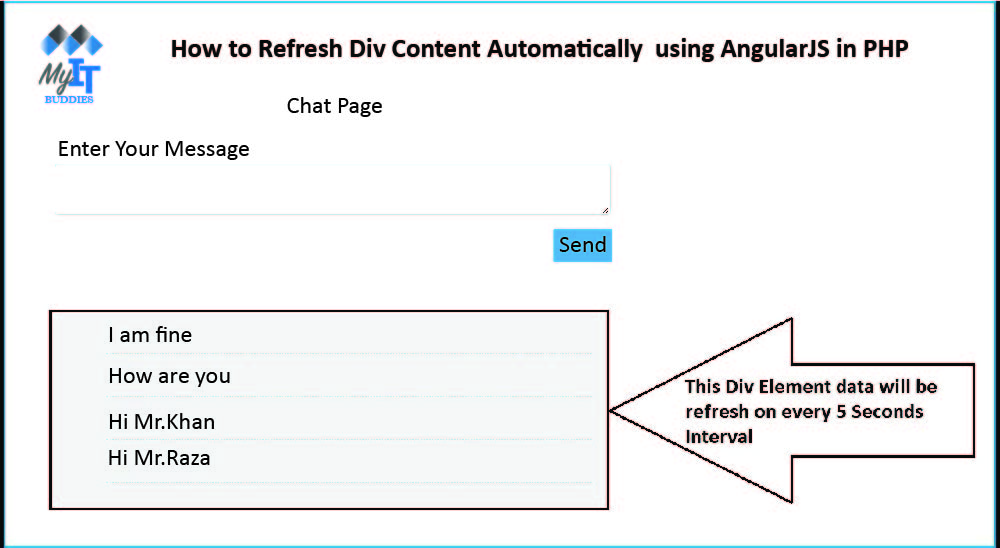
To find out how we can use the $ interval service to automatically update div content without updating the website. Here we used a PHP script and created a simple chat application using AngularJS and PHP. In this chat application we have seconds loaded into the div tag using the AngularJS function which calls the PHP script to retrieve data from the MySQL data and display it under the div tag, we have that uses Angular's $ interval service here. We can use this service just like setInterval (). In this service we have also set our function fetchData () and a time interval of 5 seconds, so that the service $ interval has called the function fetchData () every 5 seconds. It sends the request to the PHP script, data from the MySQL chat Table, and then appears in Div without refreshing the webpage. If you want to build a robust web application with AngularJS and PHP, this source code is helpful. This way, the div content is automatically updated with PHP using the AngularJS $ Interval Service.


Source Code


--
-- Database: `testing`
--

-- --------------------------------------------------------

--
-- Table structure for table `chat`
--

CREATE TABLE `chat` (
  `chat_id` int(11) NOT NULL,
  `chat_content` text NOT NULL
) ENGINE=InnoDB DEFAULT CHARSET=latin1;

--
-- Indexes for dumped tables
--

--
-- Indexes for table `chat`
--
ALTER TABLE `chat`
  ADD PRIMARY KEY (`chat_id`);

--
-- AUTO_INCREMENT for dumped tables
--

--
-- AUTO_INCREMENT for table `chat`
--
ALTER TABLE `chat`
  MODIFY `chat_id` int(11) NOT NULL AUTO_INCREMENT;
COMMIT;


database_connection.php


<?php

//database_connection.php

$connect = new PDO("mysql:host=localhost;dbname=testing", "root", "");


?>


index.php


<!DOCTYPE html>
<html>
 <head>
  <title>How to Refresh Div Content Automatically  using AngularJS in PHP</title>
  <link href="https://maxcdn.bootstrapcdn.com/bootstrap/3.3.7/css/bootstrap.min.css" rel="stylesheet">
  <script src="http://ajax.googleapis.com/ajax/libs/angularjs/1.5.7/angular.min.js"></script>
  <style>
  #load_tweets
    {
      padding:16px;
      background-color:#f1f1f1;
      margin-bottom:30px;
    }
    #load_tweets li
    {
      padding:12px;
      border-bottom:1px dotted #ccc;
      list-style: none;
    }
  </style>
 </head>
 <body>
  <br />
   <h3 align="center">How to Refresh Div Content Automatically  using AngularJS in PHP</h3>
  <br />
  <div ng-app="autoRefreshApp" ng-controller="autoRefreshController" class="container" style="width:100%; max-width:600px;">
   <h3 align="center">Chat Page</h3>

   <div class="alert alert-success alert-dismissible" ng-show="success">
    <a href="#" class="close" aria-label="close">&times;</a>
    {{ successMessage }}
   </div>

   <form method="post" ng-model="form_data" ng-submit="submitForm()">
    <div class="form-group">
     <label>Enter Your Message</label>
     <textarea name="content" class="form-control" ng-model="form_data.content"></textarea>
    </div>
    <div class="form-group" align="right">
     <input type="submit" name="submit" class="btn btn-info" value="Send" />
    </div>
   </form>
   <div id="load_tweets">
    <ul>
     <li ng-repeat="messageData in messagesData">
      {{ messageData.chat_content }}
     </li>
    </ul>
   </div>
  </div>
 </body>
</html>

<script>

var app = angular.module('autoRefreshApp', []);

app.controller('autoRefreshController', function($scope, $http, $interval){

 $scope.success = false;

 $scope.submitForm = function(){
  $http({
   method:"POST",
   url:'insert.php', 
   data:$scope.form_data
  }).success(function(data){
   if(data.message != '')
   {
    $scope.form_data = null;
    $scope.success = true;
    $scope.successMessage = data.message;
    $interval(function(){
     $scope.success = false;
    }, 5000);
   }
  });
 };

 $scope.fetchData = function(){
  $http.get('fetch_data.php').success(function(data){
   $scope.messagesData = data;
  });
 };

 $interval(function(){
  $scope.fetchData();
 }, 5000);

});


</script>


insert.php


<?php

//insert.php

include("database_connection.php");

$form_data = json_decode(file_get_contents("php://input"));

if(!empty($form_data->content))
{
 $data = array(
  ':chat_content'  => $form_data->content
 );
 $query = "
 INSERT INTO chat 
 (chat_content) VALUES (:chat_content)
 ";
 $statement = $connect->prepare($query);
 if($statement->execute($data))
 {
  $output = array(
   'message' => 'Message Sended'
  );
  echo json_encode($output);
 }
}

?>


fetch_data.php


<?php

//fetch_data.php

include("database_connection.php");

$query = "SELECT * FROM chat ORDER BY chat_id DESC";

$statement = $connect->prepare($query);

if($statement->execute())
{
 while($row = $statement->fetch(PDO::FETCH_ASSOC))
 {
  $data[] = $row;
 }
 echo json_encode($data);
}

?>


How To Delete Mysql Table Data Using AngularJS Tutorial with PHP

How To Delete Mysql Table Data Using AngularJS Tutorial with PHP

Hello friends, in this tutorial we learn how to delete or delete data from the MySQL table using Angular Javascript with PHP code without Pag update. In the previous post we explained how the data from the mysql table is mirrored with angled Javascript. Suppose you were working on an application based on Angular Javascript and PHP and you want to delete data in that application. So how can you delete data in Angular Javascript with PHP code? We discuss this in a video tutorial that you can find with this publication. In most applications, deleting data is the most important task because the application publishes a lot of spam and unwanted data on your website. You want to delete this data and only clean data. At this point, the data must be deleted. This is a simple application using the crud-list operation we created using Angular JavaScript code with PHP programming. Here we can insert or add data to the MySQL table website, we can update or edit the data in the MySQL table and finally we can delete the MySQL data, this way we can do this simple application with PHP crud operation with the Angular Javascript framework.


Source Code


 <!DOCTYPE html>  
 <!-- index.php !-->  
 <html>  
      <head>  
           <title>MyitBuddies Tutorials  | How To Delete Mysql Table Data Using AngularJS Tutorial with PHP </title>  
           <link rel="stylesheet" href="https://maxcdn.bootstrapcdn.com/bootstrap/3.3.6/css/bootstrap.min.css" />  
           <script src="http://ajax.googleapis.com/ajax/libs/angularjs/1.4.8/angular.min.js"></script>  
      </head>  
      <body>  
           <br /><br />  
           <div class="container" style="width:500px;">  
                <h3 align="center">How To Delete Mysql Table Data Using AngularJS Tutorial with PHP  </h3>  
                <div ng-app="myapp" ng-controller="usercontroller" ng-init="displayData()">  
                     <label>First Name</label>  
                     <input type="text" name="first_name" ng-model="firstname" class="form-control" />  
                     <br />  
                     <label>Last Name</label>  
                     <input type="text" name="last_name" ng-model="lastname" class="form-control" />  
                     <br />  
                     <input type="hidden" ng-model="id" />  
                     <input type="submit" name="btnInsert" class="btn btn-info" ng-click="insertData()" value="{{btnName}}"/>  
                     <br /><br />  
                     <table class="table table-bordered">  
                          <tr>  
                               <th>First Name</th>  
                               <th>Last Name</th>  
                               <th>Update</th>  
                               <th>Delete</th>  
                          </tr>  
                          <tr ng-repeat="x in names">  
                               <td>{{x.first_name}}</td>  
                               <td>{{x.last_name}}</td>  
                               <td><button ng-click="updateData(x.id, x.first_name, x.last_name)" class="btn btn-info btn-xs">Update</button></td>  
                               <td><button ng-click="deleteData(x.id )"class="btn btn-danger btn-xs">Delete</button></td>  
                          </tr>  
                     </table>  
                </div>  
           </div>  
      </body>  
 </html>  
 <script>  
 var app = angular.module("myapp",[]);  
 app.controller("usercontroller", function($scope, $http){  
      $scope.btnName = "ADD";  
      $scope.insertData = function(){  
           if($scope.firstname == null)  
           {  
                alert("First Name is required");  
           }  
           else if($scope.lastname == null)  
           {  
                alert("Last Name is required");  
           }  
           else  
           {  
                $http.post(  
                     "insert.php",  
                     {'firstname':$scope.firstname, 'lastname':$scope.lastname, 'btnName':$scope.btnName, 'id':$scope.id}  
                ).success(function(data){  
                     alert(data);  
                     $scope.firstname = null;  
                     $scope.lastname = null;  
                     $scope.btnName = "ADD";  
                     $scope.displayData();  
                });  
           }  
      }  
      $scope.displayData = function(){  
           $http.get("select.php")  
           .success(function(data){  
                $scope.names = data;  
           });  
      }  
      $scope.updateData = function(id, first_name, last_name){  
           $scope.id = id;  
           $scope.firstname = first_name;  
           $scope.lastname = last_name;  
           $scope.btnName = "Update";  
      }  
      $scope.deleteData = function(id){  
           if(confirm("Are you sure you want to delete this data?"))  
           {  
                $http.post("delete.php", {'id':id})  
                .success(function(data){  
                     alert(data);  
                     $scope.displayData();  
                });  
           }  
           else  
           {  
                return false;  
           }  
      }  
 });  
 </script>  

delete.php


 <?php  
 //delete.php  
 $connect = mysqli_connect("localhost", "root", "", "testing");  
 $data = json_decode(file_get_contents("php://input"));  
 if(count($data) > 0)  
 {  
      $id = $data->id;  
      $query = "DELETE FROM tbl_user WHERE id='$id'";  
      if(mysqli_query($connect, $query))  
      {  
           echo 'Data Deleted';  
      }  
      else  
      {  
           echo 'Error';  
      }  
 }  
 ?>  

How To Submit Form Data Using AngularJS and PHP With Validation

How To Submit Form Data Using AngularJS and PHP  With Validation

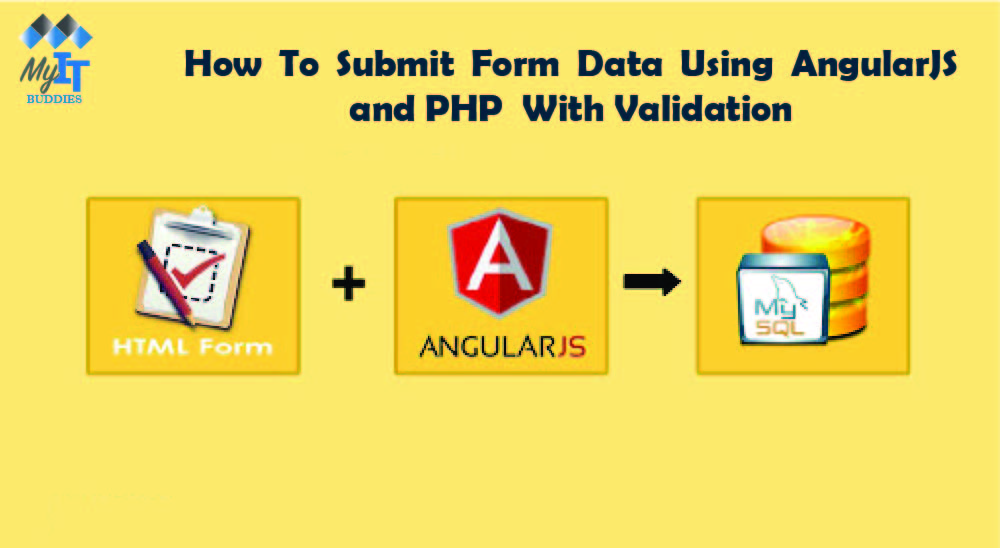
In this post, you will learn how to submit form data using AngularJS and validate using PHP script. We all know how to submit a form using Ajax in JQuery. But now we do it with AngularJS. In current web development there is a lot of technology with which we can submit the form. That is why we want to know how we can present at least some of the most important technologies that are widely used. This makes AngularJS one of the most commonly used source termination technologies, according to JQuery. This is also managed by Google Inc. in its hosted library.

We have already published several later publications, in which we have already discussed the operation Insert Delete Delete Crud from AngularJS, load files with AngularJS and much more. But do you know that we have learned an advanced AngularJS topic. Here we will process the form data with AngularJS and perform the required field validation with PHP Script. We all know the basic uses of the AngularJS directives, event. With this basic concept, we create a simple AngularJS application that makes it easy to insert user data into the mysql table.


We all know that even though we sent Jquery simple text form data, at that point we were using the simple serialize () method and using this method we converted the form data to an url-encoded string. In AngularJS, however, we want to create an empty object for connection form data. Then this object name must be defined in another input marking guideline for the ng model. After defining the object in the ng-model directive after the form data has been linked to the object. After submitting the form, the form data was linked to this form object, and in the PHP script we can access the form field via Object.

To display the validation error message, we used the AngularJS directive ng-show in the HTML tag. The main functionality of this directive is that the HTML element is visible on the website when it has a certain value. Otherwise it will be hidden. In this way, we have used various AngularJS functions to send form data to the server with validation.


Source Code


index.php


<!DOCTYPE html>
<html>
 <head>
  <title>MyitBuddies Tutorials | How To Submit Form Data Using AngularJS and PHP  With Validation  </title>
  <link rel="stylesheet" href="https://maxcdn.bootstrapcdn.com/bootstrap/3.3.6/css/bootstrap.min.css" />
  <script src="http://ajax.googleapis.com/ajax/libs/angularjs/1.4.8/angular.min.js"></script>
 </head>
 <body>
  <br /><br />
  <div class="container" style="width:750px;">
   <h3 align="center">How To Submit Form Data Using AngularJS and PHP  With Validation  </h3>
   <br /><br />
   <div ng-app="myapp" ng-controller="formcontroller">
    <form name="userForm" ng-submit="insertData()">
     <label class="text-success" ng-show="successInsert">{{successInsert}}</label>
     <div class="form-group">
      <label>First Name <span class="text-danger">*</span></label>
      <input type="text" name="first_name" ng-model="insert.first_name" class="form-control" />
      <span class="text-danger" ng-show="errorFirstname">{{errorFirstname}}</span>
     </div>
     <div class="form-group">
      <label>Last Name <span class="text-danger">*</span></label>
      <input type="text" name="last_name" ng-model="insert.last_name" class="form-control" />
      <span class="text-danger" ng-show="errorLastname">{{errorLastname}}</span>
     </div>
     <br />
     <div class="form-group">
      <input type="submit" name="insert" class="btn btn-info" value="Insert"/>
     </div>
    </form>
   </div>
  </div>
 </body>
</html>


<script>
var application = angular.module("myapp", []);
application.controller("formcontroller", function($scope, $http){
 $scope.insert = {};
 $scope.insertData = function(){
  $http({
   method:"POST",
   url:"insert.php",
   data:$scope.insert,
  }).success(function(data){
   if(data.error)
   {
    $scope.errorFirstname = data.error.first_name;
    $scope.errorLastname = data.error.last_name;
    $scope.successInsert = null;
   }
   else
   {
    $scope.insert = null;
    $scope.errorFirstname = null;
    $scope.errorLastname = null;
    $scope.successInsert = data.message;
   }
  });
 }
});
</script>


insert.php


<?php
//insert.php
$connect = mysqli_connect("localhost", "root", "", "testing");
$form_data = json_decode(file_get_contents("php://input"));
$data = array();
$error = array();

if(empty($form_data->first_name))
{
 $error["first_name"] = "First Name is required";
}

if(empty($form_data->last_name))
{
 $error["last_name"] = "Last Name is required";
}

if(!empty($error))
{
 $data["error"] = $error;
}
else
{
 $first_name = mysqli_real_escape_string($connect, $form_data->first_name); 
 $last_name = mysqli_real_escape_string($connect, $form_data->last_name);
 $query = "
  INSERT INTO tbl_user(first_name, last_name) VALUES ('$first_name', '$last_name')
 ";
 if(mysqli_query($connect, $query))
 {
  $data["message"] = "Data Inserted...";
 }
}

echo json_encode($data);

?>


--
-- Database: `testing`
--

-- --------------------------------------------------------

--
-- Table structure for table `tbl_user`
--

CREATE TABLE IF NOT EXISTS `tbl_user` (
  `id` int(11) NOT NULL,
  `first_name` varchar(250) NOT NULL,
  `last_name` varchar(250) NOT NULL
) ENGINE=InnoDB AUTO_INCREMENT=4 DEFAULT CHARSET=latin1;

--
-- Dumping data for table `tbl_user`
--

INSERT INTO `tbl_user` (`id`, `first_name`, `last_name`) VALUES
(1, 'Peter', 'Parker'),
(2, 'John', 'Smith'),
(3, 'Kevin', 'Peterson');

--
-- Indexes for dumped tables
--

--
-- Indexes for table `tbl_user`
--
ALTER TABLE `tbl_user`
  ADD PRIMARY KEY (`id`);

--
-- AUTO_INCREMENT for dumped tables
--

--
-- AUTO_INCREMENT for table `tbl_user`
--
ALTER TABLE `tbl_user`
  MODIFY `id` int(11) NOT NULL AUTO_INCREMENT,AUTO_INCREMENT=4;


How to Use AngularJS Working with Jquery Datatable In PHP

How to Use AngularJS Working with Jquery Datatable In PHP

We all know that the Jquery Datatables plug-in is a premium, high-level Jquery plug-in that converts simple data from HTML tables into a grid format. Previously, in one of our web tutorials we published on how to process the JQuery Datatables server side in PHP, we received a great response from our site viewer and asked us to create a tutorial on how to process the Jquery Datatables server side with AngularJS Datatable with PHP Since Angular Datatable is one of the angle modules for which only the data table directive, but also the data table options and aids have been provided, we can use the Angular Datatables module to create an elegant tabular grid list in Our angular web application with functions such as Pagination, search, classification, etc. Therefore, in this post we will discuss topics such as server-side processing of Angular Datatables with PHP script and MySQL database. In this post, we not only covered the tutorial in simple steps, but you will also find a video tutorial, a live demo, and source code for using the plugin for jquery data tables with AngularJS and PHP.

Below is the file structure of this tutorial source code.

  • Index.php
  • Fetch.php


Step 1 - Create Database with Data


Here we covered a topic on server-side processing of JQuery data tables with AngularJs PHP. To do this, we first have to create a client table and insert some client data into the tables table.


--
-- Database: `test`
--

-- --------------------------------------------------------

--
-- Table structure for table `tbl_customer`
--

CREATE TABLE `tbl_customer` (
  `CustomerID` int(11) NOT NULL,
  `CustomerName` varchar(250) NOT NULL,
  `Address` text NOT NULL,
  `City` varchar(250) NOT NULL,
  `PostalCode` varchar(30) NOT NULL,
  `Country` varchar(100) NOT NULL
) ENGINE=MyISAM DEFAULT CHARSET=latin1;

--
-- Dumping data for table `tbl_customer`
--

INSERT INTO `tbl_customer` (`CustomerID`, `CustomerName`, `Address`, `City`, `PostalCode`, `Country`) VALUES
(1, 'Willie Whited', '2524 White River Way', 'Salt Lake City', '84106', 'USA'),
(2, 'Lisa Squires', 'Fehringer Strasse 27', 'MARIA BUCH', '8750', 'Austria'),
(3, 'Sean Patterson', 'Rue des Ecoles 426', 'Vlierzele', '9520', 'Belgium'),
(4, 'Anna Scott', 'Rua C 66, 1384', 'Goiania-GO', '74305-450', 'Brazil'),
(5, 'Desmond Peterson', '1414 Grey Rd', 'Feversham', 'ON N0C 1C0', 'Canada'),
(6, 'Samuel Hogan', '13, Avenue De Marlioz', 'ARGENTEUIL', '95100', 'France'),
(7, 'John Miller', 'Pappelallee 21', 'Arnsdorf', '09661', 'Germany'),
(8, 'Rose Joyce', 'Via Galileo Ferraris, 38', 'Malavicina MN', '46040', 'Italy'),
(9, 'Phillip Tilton', 'Huibertplaat 120', 'DH  Zwolle', '8032', 'Netherland'),
(10, 'Anita McGurk', '128 St Pauls Court Cloverlea', 'Palmerston North', '4412', 'New Zealand'),
(11, 'John Morgan', '286 Stanza Bopape St', 'Louis Trichardt', '0923', 'South Africa'),
(12, 'Margaret Teets', 'Grossmatt 62', 'Betschwanden', '8777', 'Switzerland'),
(13, 'Dara Adams', '21 Fraserburgh Rd', 'LINNELS', 'NE46 8YB', 'United Kingdom'),
(14, 'Bennie J. Martin', '34 Masthead Drive', 'PARK AVENUE QLD', '4701', 'Australia'),
(15, 'Gladys Ashford', 'Holzstrasse 14', 'SALCHENDORF', '9064', 'Austria'),
(16, 'William Lavallie', 'Heirstraat 31', 'Marchin', '4570', 'Belgium'),
(17, 'Antonio Wayman', '2331 Carlson Road', 'Prince George', 'BC V2L 5E5', 'Canada'),
(18, 'Carol Selders', 'Ysitie 44', 'TAMPERE', '33240', 'Finland'),
(19, 'David Sato', '30, Rue de la Pompe', 'MANOSQUE', '04100', 'France'),
(20, 'Amy Vanmatre', 'Friedrichstrasse 4', 'Dusseldorf Flehe', '40223', 'Germany'),
(21, 'Kenny Todd', 'Corso Porta Nuova, 10', 'Quara RE', '42010', 'Italy'),
(22, 'Marla Alvarez', 'Tielstraat 17', 'Amsterdam-Zuidoost', '1107 RC', 'Netherland'),
(23, 'George Stanley', '95 Belle Verde Drive Rothesay Bay', 'North Shore', '0630', 'New Zealand'),
(24, 'David Bennett', 'Torvbakkgata 219', 'OSLO', '0550', 'Norway'),
(25, 'Donald Garrett', '86 St Denys Road', 'POYS STREET', 'IP17 9TF', 'United Kingdom'),
(26, 'Horace Morgan', '3435 Jarvis Street', 'Buffalo', '14202', 'United States');


Step 2 - Insert Angular, Angular Datatables, Bootstrap and Jquery File


Then we would like to add various library files such as AngularJs, the add-in AngularJS Datatables, the add-in Jquery Datatables, the Jquery library and the Link Bootstrap library to the header of our index page.


<head>
  <script src="jquery.min.js"></script>
  <script src="https://ajax.googleapis.com/ajax/libs/angularjs/1.3.15/angular.min.js"></script>
  <script src="angular-datatables.min.js"></script>
  <script src="jquery.dataTables.min.js"></script>
  <link rel="stylesheet" href="bootstrap.min.css">
  <link rel="stylesheet" href="datatables.bootstrap.css">
 </head>


Step 3 - Write HTML Code


Now we have to write an HTML code on the index.html page. In this code, we have defined the ng-app and ng-controller angle instructions, which load the module and handle the controller in our AngularJS application.


  <div ng-app="customerApp" ng-controller="customerController" class="container">

   <br />
   <h3 align="center">How to Use AngularJS Working with Jquery Datatable In PHP</h3>
   <br />

   <table datatable="ng" dt-options="vm.dtOptions" class="table table-striped table-bordered">
    <thead>
     <tr>
      <th>Sr</th>
      <th>Customer Name</th>
      <th>Address</th>
      <th>City</th>
      <th>Postal Code</th>
      <th>Country</th>
     </tr>
    </thead>
    <tbody>
     <tr ng-repeat="customer in customers">
      <td>{{ $index + 1 }}</td>
      <td>{{ customer.CustomerName }}</td>
      <td>{{ customer.Address }}</td>
      <td>{{ customer.City }}</td>
      <td>{{ customer.PostalCode }}</td>
      <td>{{ customer.Country }}</td>
     </tr>
    </tbody>
   </table>
   <br />
   <br />
  </div>


Step 4 - Write AngularJS code for Fetch Data


After that, we have to write the AngularJS code into which we loaded the AngularJS data table module and also handle the controller. Then we sent the Ajax request to the server-side PHP script for fetch.php and retrieved customer data from our MySQL database.


<script>

var app = angular.module('customerApp', ['datatables']);

app.controller('customerController', function($scope, $http){
 $http.get('fetch.php').success(function(data, status, headers, config){
  $scope.customers = data;
 });
});

</script>


Step 5 - Fetch Recrods from Mysql Database


Finally, we need to write PHP code to the fetch.php file and retrieve data from the Mysql tbl_customer database table. Here we want to convert data to JSON format to display data in data tables. Therefore, we first save data in PHP array and convert it to JSON strings using the json_encode () function.


<?php

//fetch.php

$connect = new PDO('mysql:host=localhost;dbname=test', 'root', '');

$query = "SELECT * FROM tbl_customer ORDER BY CustomerID DESC";

$statement = $connect->prepare($query);

$statement->execute();

while($row = $statement->fetch(PDO::FETCH_ASSOC))
{
 $data[] = $row;
}

echo json_encode($data);

?>